


If you are evaluating ERP for a manufacturing business here, you have probably noticed that every brochure says roughly the same thing. That makes it hard to tell the products apart, and harder still to work out which one fits your plant.
So this article starts from the other end. Below are seven problems we hear most often from manufacturers in the UAE and the wider GCC. For each one, we explain what causes it, what Sage X3 actually does about it, and where the software stops and your own process discipline has to take over.
Read the sections that sound like your business. Skip the rest.
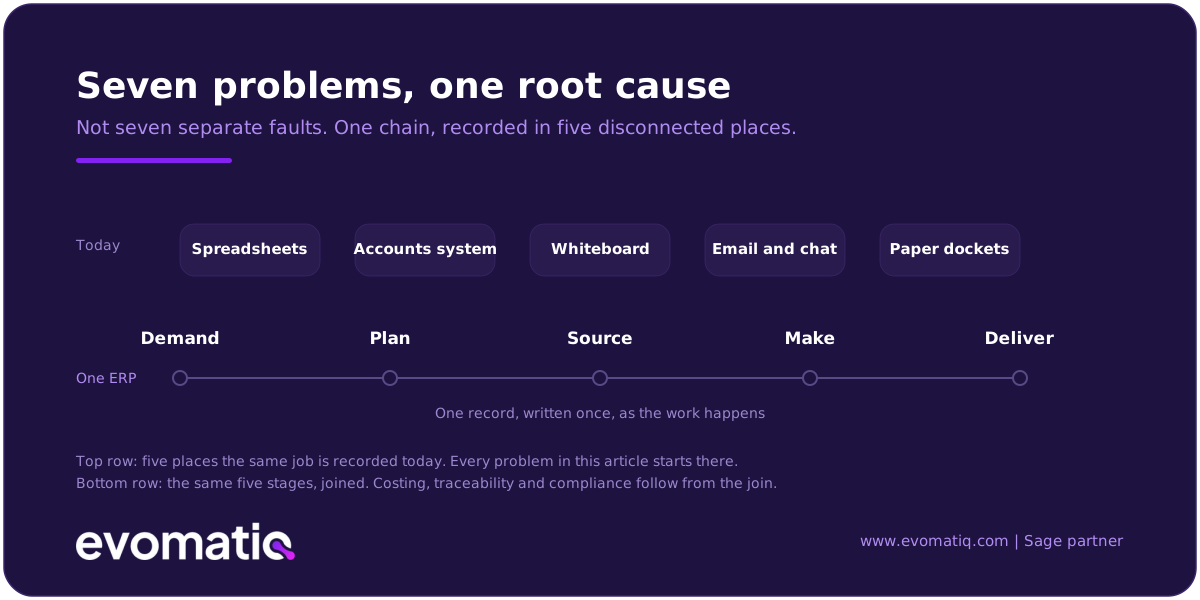
1. You don't know what a job really cost until long after it shipped
Why it happens. Your accounts are in one system, production is in spreadsheets, and the two only meet at month-end. By the time the numbers are reconciled, the order has been delivered, invoiced, and the quote for the next one has already gone out. Material prices moved, a machine ran two shifts instead of one, a subcontractor charged more than expected, and none of it shows up until it is too late to act.
What Sage X3 does about it
- Holds an annual standard cost per item, lets you run standard cost revisions, and lets you calculate several simulated standard costs side by side before you commit to one.
- Splits cost by material, labour, machine, subcontracting, and overhead, so you can see which element moved.
- Produces variance analysis per item, so the gap between standard and actual is visible on the item, not buried in a departmental total.
- Lets you build cost budgets to plan standard costs for future periods, which is the difference between a quote based on last year's prices and one based on next quarter's.
Costing is only as good as the data your floor records. If work orders are closed in batches at the end of the week from memory, Sage X3 will give you precise numbers built on rough inputs. Getting this right is a shop-floor discipline question first and a software question second.
2. The stock figure on the system does not match the stock on the floor
Why it happens. Goods move faster than paperwork. Material is issued to a job without a transaction, returns go back to the wrong bin, and a single item exists in three places under two part numbers. Then purchasing buys what you already have, or production stops for something that was sitting in the yard.
What Sage X3 does about it
- Records stock at site, location, and lot level, so a balance can be traced down to a bin rather than a warehouse.
- Supports handheld RF devices and barcode printing, so movements are captured where they happen instead of on a clipboard.
- Runs directed put-away and directed picking, so the system tells the storeman where to go rather than relying on his memory of the racking.
- Applies quality management at receipt, so material is accepted, rejected, or quarantined based on inspection results before it can be issued to a job.
No ERP fixes an unlabelled warehouse. If your locations are not defined and your items are not uniquely coded, expect to spend real effort on that before go-live. It is unglamorous work and it is the single biggest predictor of whether your inventory data will be trusted six months later.
3. You quote delivery dates you cannot defend
Why it happens. Sales promises a date, the planner finds out later, and the plan is a whiteboard that one person maintains. When a rush order arrives, nobody can say what it will displace. So dates get padded, customers get frustrated anyway, and the plant runs hot and cold.
What Sage X3 does about it
- Runs material requirements planning and master production scheduling, so demand, forecasts, stock, and open orders resolve into one requirement plan.
- Schedules against both finite and infinite capacity, so you can see the ideal plan and the plan your actual machines and shifts can deliver.
- Lets planners view, simulate, and update outstanding work orders and routing operations by dragging them, so the effect of a rush order on everything else is visible before you commit.
- Supports several manufacturing modes in one system, including make-to-stock, make-to-order, assemble-to-order, configure-to-order, and capable-to-order, which matters if part of your range is standard and part is built to a customer drawing.
A schedule is only credible if routings and machine capacities are accurate. Most manufacturers we work with discover their routing times are years out of date. Plan to remeasure them.
4. Product specifications live in people's heads and in spreadsheets
Why it happens. The engineer keeps the current version, production keeps a printed copy from last year, and the change everyone agreed to on WhatsApp never made it into either. The result is scrap, rework, and arguments about which version was correct.
What Sage X3 does about it
- Handles multi-level bills of material, with separate usage for production BOMs, engineering bills, prototypes, and sales kits.
- Controls which BOM applies by validity date and by production quantity, so you can hold different structures for a one-off, a hundred-unit batch, and a thousand-unit batch.
- Allows several BOMs per item, so variants do not need a duplicated part master.
- Links work centres and cost centres to machine and labour cost data, resources, and factory calendars, so a BOM change flows through to cost and capacity rather than sitting in isolation.
- Includes a configurator for products assembled to customer specification, and lets you search technical data rather than hunt through drawings.
Sage X3 will enforce whatever change control process you define. It will not invent one. If engineering and production do not agree on who approves a change, the software will faithfully record the disagreement.
5. A quality complaint takes days to trace
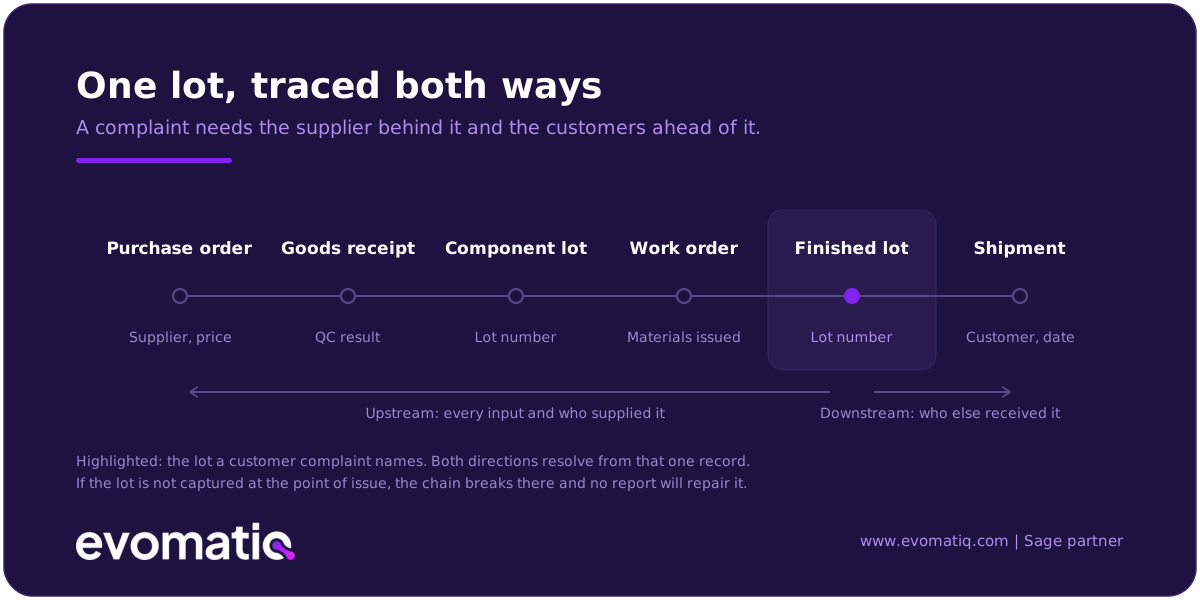
Why it happens. A customer calls about a batch. To answer, someone has to work backwards through delivery notes, production records, and goods receipts, usually across three systems. Meanwhile you cannot tell the customer which other batches are affected, so you either recall too much or too little.
What Sage X3 does about it
- Tracks lots upstream and downstream, from purchase order and material receipt, through work orders for sub-assemblies and finished goods, to shipments and customer returns.
- Records quality control results at receipt and at production stages, attached to the lot rather than filed separately.
- Gives multi-level traceability in real time, so a query on a finished lot resolves to the raw material lots and the supplier behind them.
Traceability depends on lot and serial discipline at every handover. If material is issued without recording the lot, the chain breaks at that point and no amount of reporting will repair it.
6. Work you send to subcontractors disappears from view
Why it happens. Plating, machining, printing, packing, or a whole sub-assembly goes out to a third party. Once it leaves the gate it lives in an email thread. You do not know what stock sits at the subcontractor, what it is costing you, or when it is coming back. This is common here, where many manufacturers deliberately run lean and outsource capacity rather than buy it.
What Sage X3 does about it
- Manages the subcontracting process through purchasing, so outsourced operations are ordered, monitored, and received like any other supply.
- Distinguishes between components you supply to the subcontractor and components the subcontractor supplies, which is usually where costing goes wrong.
- Holds supplier and pricing detail for outsourced services so you can run full cost analysis on the make-versus-buy decision instead of guessing.
- Handles exchanges between locations and between companies in the same group, which matters if one of your entities effectively subcontracts to another.
You will still need to agree data with your subcontractors, particularly on scrap and yield. The system gives you a place to record the agreement and a way to see when reality diverges from it.
7. Compliance deadlines are arriving faster than your finance system can cope
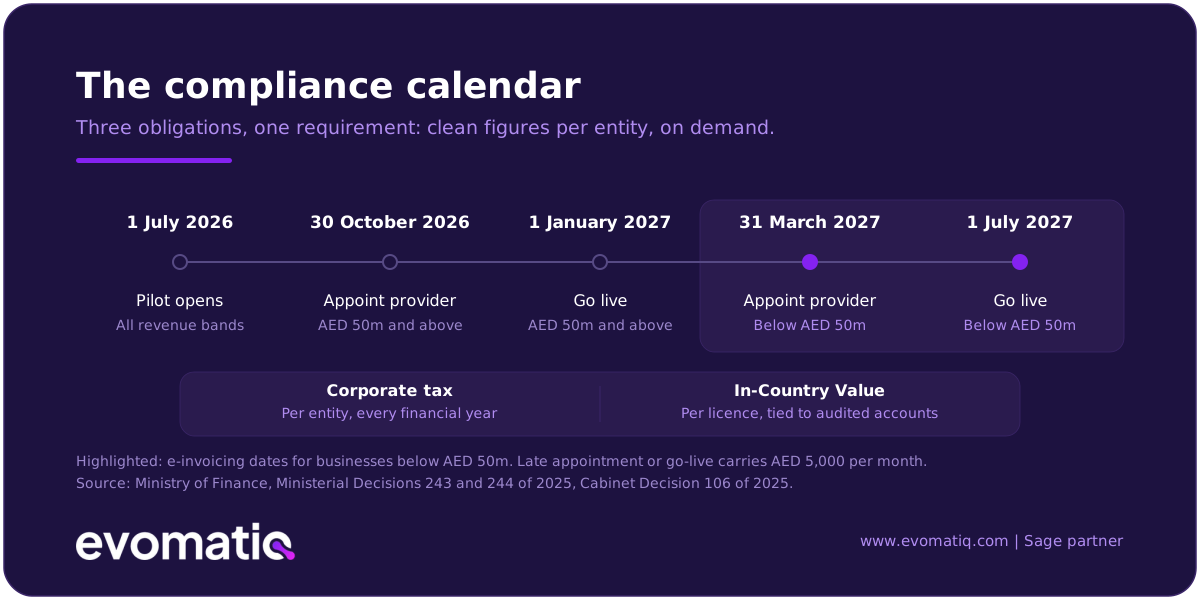
Why it hurts. Three obligations now rest on the same capability: producing clean, structured, entity-level numbers on demand. E-invoicing needs it on every transaction. Corporate tax needs it annually, per entity. ICV needs it annually, per licence. If that data is currently rebuilt from spreadsheets each cycle, you pay for the same work three times. The deadlines are external. The cost of meeting them is internal, and it is mostly a data problem.
What is actually due
- E-invoicing. Voluntary and pilot use opened 1 July 2026. AED 50 million-plus revenue: appoint an Accredited Service Provider by end of October 2026, mandatory issuance from 1 January 2027. Below that threshold: provider by 31 March 2027, live from 1 July 2027. Invoices as structured XML to the PINT AE schema, exchanged through an accredited provider, records stored in the UAE.
- Corporate tax. Results separated by legal entity and by activity, in a form that survives audit. Relevant to anyone running several entities, or both mainland and free zone operations.
- ICV. For a goods manufacturer the score is driven largely by manufacturing cost. The submission needs local versus imported purchase spend, spend by supplier with each supplier's own ICV certificate, revenue split between UAE and overseas customers, net book value of UAE assets, and Emirati headcount, all reconciling to audited financial statements.
What Sage X3 does about it
- Holds invoice data in complete structured form, which is what an accredited provider needs to transmit on your behalf.
- Runs multiple companies, sites, currencies, and legislations in one installation, with intercompany transactions handled rather than journalled by hand.
- Structures supplier, cost, and revenue data so that preparing an ICV submission is extraction rather than reconstruction.
Sage X3 is not an Accredited Service Provider, and neither are we. Our job is to make sure the data your system produces is fit to transmit and that the integration is built and tested before your deadline, not during it. Sage X3 will not complete an ICV template for you. And whether a particular structure qualifies for free zone treatment is a question for your tax adviser, not your ERP vendor.
What Sage X3 is not
Clarity is more useful to you than a feature list, so:
- It is not the cheapest option. If you are a fifteen-person workshop with one product line, a mid-market ERP is likely more system than you need, and we will tell you so.
- It is not a quick install. A serious manufacturing implementation is measured in months, not weeks. Anyone promising otherwise is describing a finance-only go-live.
- It is not a substitute for process design. Roughly half the value comes from decisions your team makes about how work should run. Those conversations are the hard part.
- It is not a machine monitoring system. Sage X3 integrates with advanced planning and shop floor execution systems, but if your primary need is real-time machine telemetry, that sits alongside the ERP rather than inside it.
Deployment is flexible. Sage X3 can be run on-premises or in the cloud, which matters if your data residency requirements have changed with the tax and e-invoicing rules.
What an implementation actually takes
.svg)
For a single-site UAE manufacturer with finance, purchasing, inventory, and production in scope, expect the following from your side:
- A named project owner from your business who can make decisions, not just attend meetings.
- Clean item, supplier, customer, and BOM data. This is usually the longest task on the plan.
- Remeasured routings and realistic machine capacities.
- Time from your production supervisors during design and testing, which means covering their day jobs.
- Training for the people entering transactions, not only for managers reading reports.
We would rather set that expectation now than discover it in month three.
Where we fit
EvomatiQ is a Dubai-based enterprise software consultancy and a Sage partner. We implement and support Sage X3 for manufacturers across the UAE and the wider GCC, and we stay on afterwards for support and change.
If you are shortlisting and want a straight answer on whether Sage X3 suits your plant, book a 30-minute call. We will walk through your process, and if it is not a fit, we will say so.
Sage and Sage X3 are trademarks of The Sage Group plc or its licensors. EvomatiQ is an independent Sage partner and is not Sage.
