


This is the second of four articles on what AI is really doing to finance and operations. Each one takes a single question, answers it with evidence, and can be read on its own.
- AI Didn’t Remove the Bottleneck. It Moved It.
- Your ERP Survives AI. Your Screens Don’t. (You are here)
- Your Supplier’s Invoice Can Give Orders to Your AI
- Every AI Number You Have Been Shown Is Unaudited
Fourteen fields for one invoice
Watch an accounts clerk enter a purchase invoice. Supplier. Invoice number. Date. Purchase order. Item. Quantity. Rate. Tax code. Cost centre. Ledger account. Due date. Fourteen fields or more, tabbed through one at a time, for one piece of paper.
That screen is what most people mean when they say “the ERP”. It is what staff are trained on. It is what consultants customise. It is what everyone complains about.
So when AI arrived, the prediction wrote itself. AI can read the invoice. AI can fill the fields. Therefore AI replaces the ERP.
The first two statements are true. The third is wrong, and seeing why tells you where to spend your money over the next three years.
What an ERP really is
Take away the screens and an ERP does four jobs.
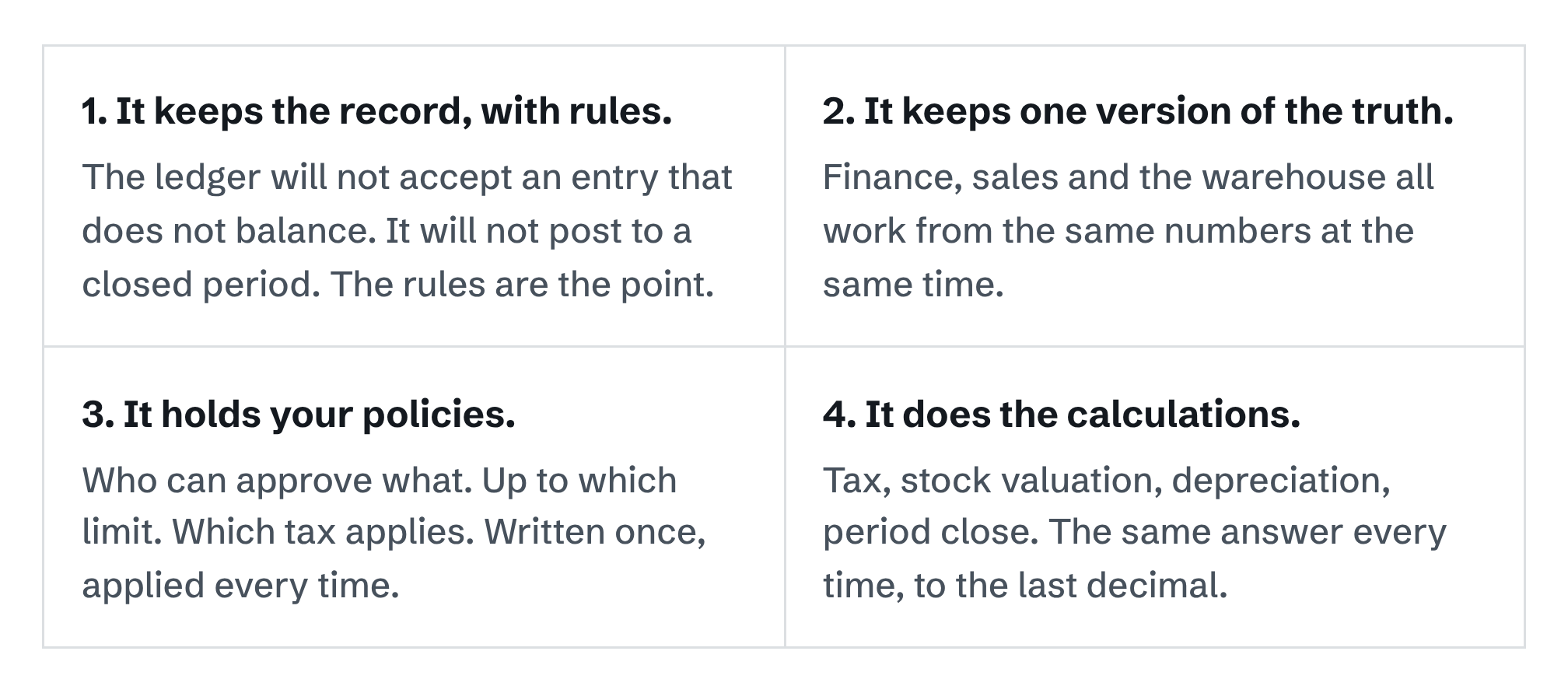
None of these four jobs is a screen. The screen was only ever the way a human got data in and reports out. It was the door, not the house.
This matters because AI is very good at one thing on that list of clerk’s tasks, which is reading a document and working out what it says. It is poor at the four jobs above. Part 1 of this series showed the numbers: AI is not reliable at arithmetic, its small errors multiply across steps, and it cannot tell you when it is wrong. An ERP is the opposite. It is boring, exact, and the same every time.
What is going away
The data entry screen. Not because anyone decided to remove it, but because the reason for it is disappearing.
You can see this in what the vendors shipped in 2026.
- Tally. TallyPrime 7.1, released in June 2026, includes an AI assistant that reads business documents and prepares the accounting entries from them. Tally says this can cut manual data entry by up to 80%. That figure is Tally’s own claim and has not been independently tested. But the direction is clear: the clerk no longer types the fourteen fields.
- Microsoft. Dynamics 365 now lets an AI agent open a form, fill in the fields and save the record without any screen being open at all. The agent works the form directly through the server. The form still exists. Nobody is looking at it.
- Sage. Sage is rolling its Copilot assistant across its products, including Sage X3, so that users ask for things in plain language. Its new finance agent prepares payment reminders, approvals and write-offs for a person to decide on.
- Epicor. Trade coverage describes Epicor as building toward “headless” ERP: a system with no fixed screens, reached by agents.
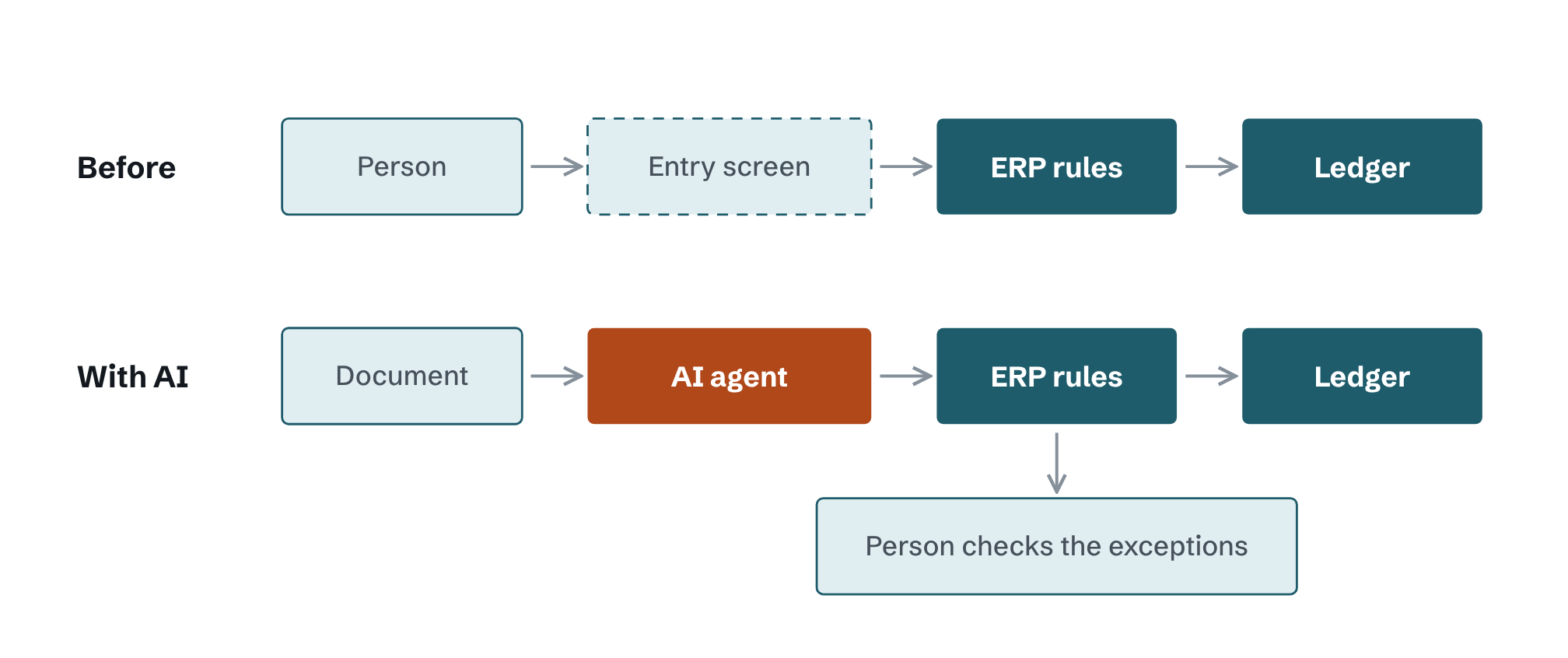
One caution. “Screens” here means the screens for typing data in. Screens for reviewing, approving and investigating are not going anywhere. As Part 1 argued, checking is now the scarce resource, so those screens become more important and deserve better design than they have had.
What is staying, and why it matters more
The ledger and the rules around it.
Here is the logic. If AI produces entries ten times faster than people did, something has to check ten times as many entries. People cannot. But a rule can. “Does it balance?” “Is the period open?” “Is this above the approval limit?” “Does this tax number have the right format?” An ERP answers these in a fraction of a second, for nothing, and never gets tired.
So the dull old ledger turns out to be the best checker of AI work that a business owns. It was built to refuse bad entries from careless humans. It refuses bad entries from confident machines just as well.
AI makes the entries. The ERP decides which ones are allowed in. The second job just became the more valuable one.
The strongest evidence for this is how the vendors built their own AI. They had every freedom to let the AI write straight into the books. None of them did.
- Tally says the user keeps “complete control before anything is posted”. The AI prepares. It does not post.
- Sage says users keep the final say, and that every AI action is logged: what was recommended, what was approved, and by whom.
- Microsoft limits each agent to the security role it has been given. It sees only the forms, fields and actions that role allows, and a call to anything outside the role is rejected.
Three vendors, three markets, one design. The AI works at the front. The ERP’s own permissions, rules and approvals stand between the AI and the ledger. The people who know these systems best have decided the core should not be touched.
The tax authority agrees
For readers in the Gulf and South Asia there is a second reason the ERP stays. It is the system your government talks to.
In Saudi Arabia, your invoicing system must be connected to ZATCA. In the UAE, e-invoicing becomes mandatory in stages from January 2027. In India, a B2B invoice above the threshold is not valid until the government portal has registered it. In each case the connection is made by an accounting or ERP system that keeps exact, numbered, unchangeable records.
An AI model is not that kind of system. It can help prepare the invoice. It cannot be the record the tax authority relies on.
What changes around it
The core stays. Four things around it will change, and each one affects your budget.
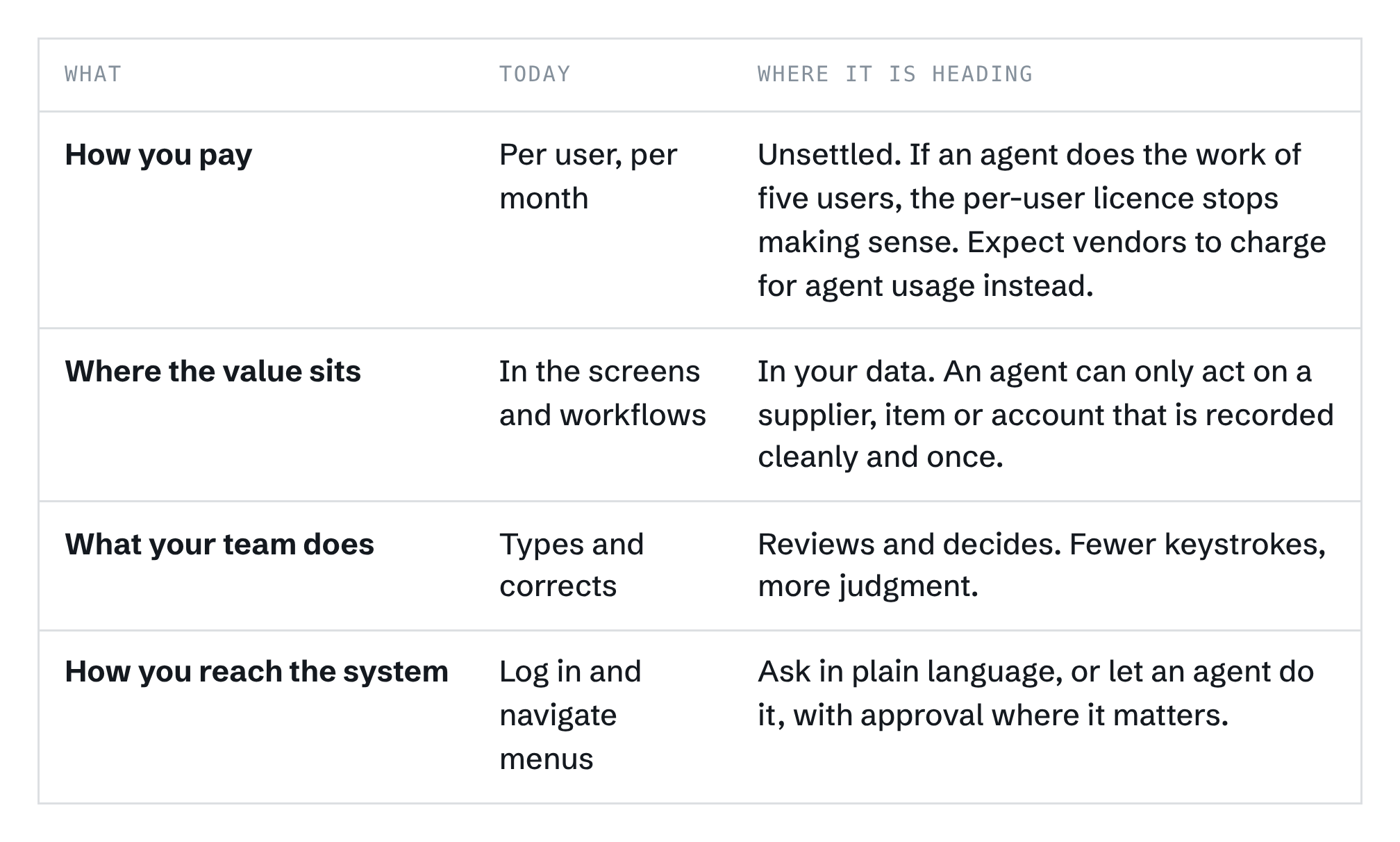
The pricing row is a forecast, not a fact. No major vendor has yet settled how it will charge when agents do the work. That uncertainty is itself useful to know before you sign a three-year renewal.
What this means for your business
1. Do not replace your ERP because of AI
If your ERP keeps correct books and meets your tax rules, it is doing the job that AI cannot do. The AI layer is being added on top by your vendor or by others. A replacement project started “for AI” spends years rebuilding the part that was already working.
2. Fix your master data first
A clerk who sees the same supplier listed twice uses common sense. An AI agent does not. It will match the invoice to whichever record it finds, at speed, hundreds of times. Duplicate suppliers, old item codes and untidy ledgers were an annoyance before. With agents they become errors at scale. This is unglamorous work, and it is the best preparation you can make.
3. Ask your vendor one question
“When your AI creates an entry, does it go through the same rules, limits and approvals as an entry typed by a person?” The answer should be yes, without hesitation. If the AI has its own shortcut into the books, your controls no longer control anything.
4. Check which version gets the AI
Vendors put new AI features on their newest cloud versions first. If you run an older or on-premise version, ask in writing what you will get and when. Announcements are also running ahead of delivery. Of the agents Sage announced in April 2026, only one came with a stated release timeline.
5. Invest in the review screen
The screen your team will live in is the one that shows what the AI prepared, with the source document beside it and a clear way to correct or reject. If that screen is poor, review becomes a click, and Part 1 explained where that leads.
A note on evidence
The vendor facts in this article come from the vendors’ own announcements and from trade press. They show what has been built and promised. They do not show how well it works. We have not found independent testing of any of these AI features inside a live ERP. Part 4 of this series is about that gap.
What comes next
So the picture is this. The data entry screen fades. The AI agent takes its place at the front. The ledger and its rules stay at the back, more valuable than before.
But look again at that agent. It now sits inside your business systems. It can prepare payments and change records, with your permissions. And its daily work is to read documents written by people outside your company: suppliers, customers, banks.
That combination has a weakness that most businesses have not yet thought about.
Next in the series · Part 3
Your Supplier’s Invoice Can Give Orders to Your AI
An AI agent cannot always tell the difference between a document it is reading and an instruction it should follow. Part 3 explains how researchers have already shown this working against Salesforce, Microsoft and ServiceNow systems, what it means for an agent that can touch your payments, and which protections work.
Still to come. Part 4: why every AI number you have been shown is unaudited, and what to ask for instead.
Sources
- Tally Solutions, Product update: TallyPrime 7.1, released 27 June 2026. The 80% figure is the vendor’s claim.
- ERP Today, Microsoft gives AI agents a governed path into Dynamics 365 ERP, 16 June 2026.
- Sage, Sage expands AI agents across finance, HR and operations, 28 April 2026.
- Epicor, Epicor introduces agentic AI stack, 19 May 2026, and related coverage of its headless ERP direction.
- EY, Saudi Arabia announces 25th wave of Phase 2 e-invoicing integration.
- KPMG, UAE: framework, scope and implementation of e-invoicing system.
- Part 1 of this series, for the figures on AI accuracy, arithmetic and self-checking.