


Most ERP projects don't struggle because the software is wrong. They struggle because a growing business is asked to change how it works while it keeps working. That is the honest root of most ERP implementation failure, and it is why the technology is often the easiest part.
If you're weighing up an ERP project, or you're in one that feels harder than it should, this guide explains where the difficulty really comes from. We cover the common failure points, the operational dependencies that slow projects down, and the people side that most plans underestimate. None of it is meant to put you off. Knowing where projects stall is the best way to keep yours moving.
What "failure" usually looks like. It is rarely a dramatic collapse. More often the system goes live late and over budget, or it goes live on time and people quietly carry on in spreadsheets. Both are failures, because the business is paying for an ERP it isn't really using.
Why mid-sized businesses feel ERP complexity most
A medium-sized business ERP project carries enterprise-level complexity with a much smaller team to absorb it. Large corporations have dedicated project staff. Small businesses can often run a package as it comes. Mid-sized companies sit in between, and that is where ERP system complexity bites hardest.
Here is what that middle ground typically looks like in the GCC:
- Your processes are too complex for out-of-the-box, but your team is too lean for a long project. You may run several legal entities, more than one currency, inventory across sites, or project-based billing. Each of those needs proper configuration.
- The people who know the business are also running it. The finance manager who understands your chart of accounts is the same person closing the month. Every hour they give the project is an hour taken from somewhere else.
- Years of workarounds have built up. Growth tends to be layered on top of an older accounting package, a few critical spreadsheets, and processes that live in one person's head. All of that has to be found, understood and either moved or retired.
- Regional rules keep moving. VAT across GCC markets, UAE corporate tax, and e-invoicing requirements all shape how your system must be set up. Getting them right is not optional, and it adds design work early on.
Common ERP implementation failure points
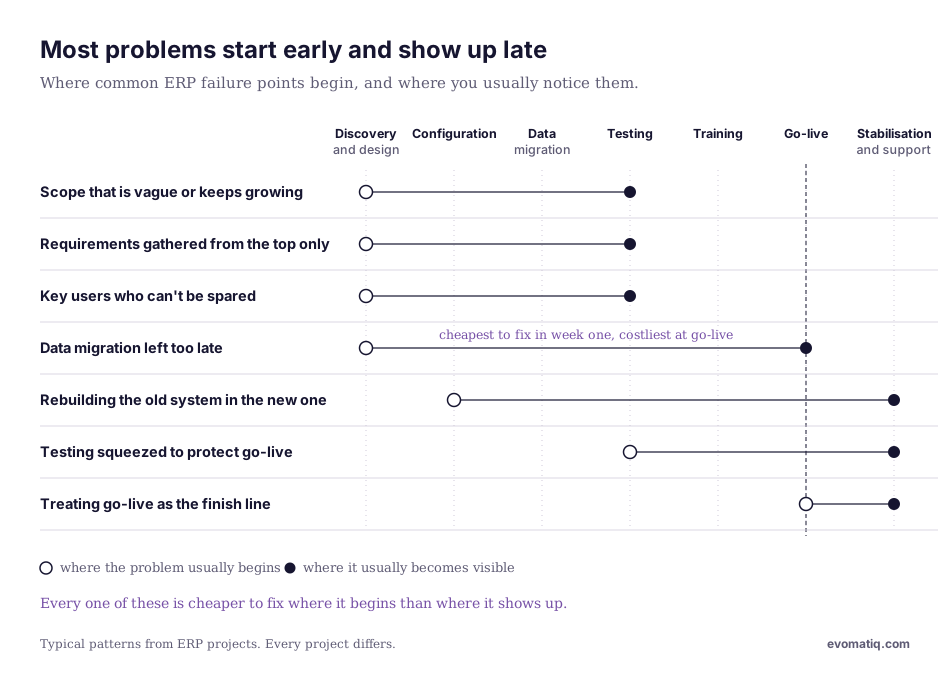
Most ERP failure causes are predictable, which is good news. They show up early if you know where to look. These are the ones we see most often.
- Scope that is vague or keeps growing. "Let's do everything" sounds ambitious but usually means nothing gets finished properly. A clear first phase, with later phases planned, is safer than one giant go-live.
- Requirements gathered from the top only. Managers describe how things should work. The people doing the work know how they actually work. You need both, or the system will be designed around a process nobody follows.
- Rebuilding the old system inside the new one. Heavy customisation to copy familiar habits feels comfortable at first. It then makes every upgrade slower and costlier. Changing the process is often cheaper than changing the software.
- Data migration left too late. Duplicate customers, inconsistent item codes and old open balances don't fix themselves. If data cleansing starts in the final month, go-live will slip or launch with bad data.
- Key users who can't be spared. If your best people are only available "when things calm down", decisions stall. A project can only move as fast as the people who sign off on it.
- Testing squeezed to protect the go-live date. When timelines slip, testing is usually the first thing cut. It is also the thing that catches problems before your customers or auditors do.
- Treating go-live as the finish line. The first few months after launch are when questions pile up and habits form. Without proper support in that window, people drift back to spreadsheets.
Operational dependencies that slow projects down
An ERP touches almost every part of the business, so one late decision can hold up several others. Many ERP implementation challenges are really dependency problems: something upstream wasn't settled, so everything downstream waits.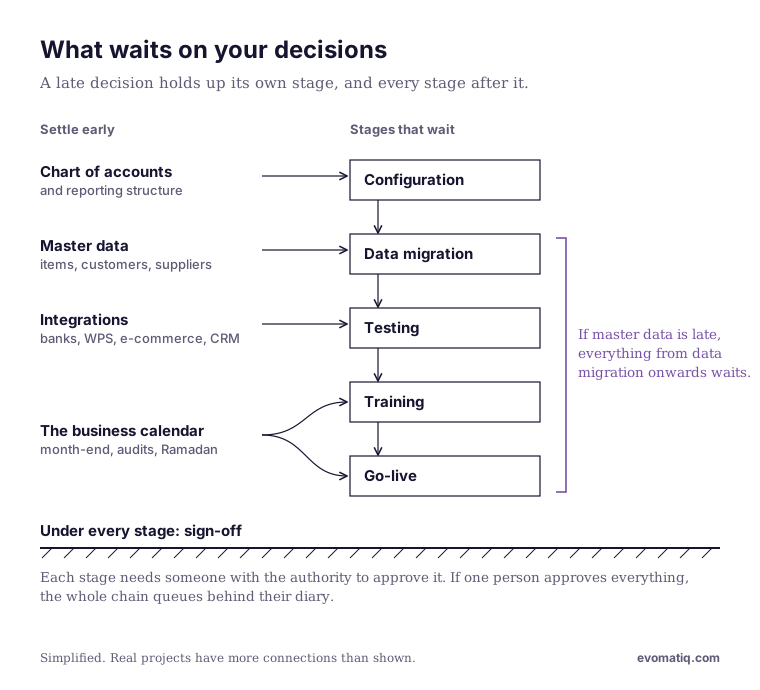
|
Dependency |
Why it holds things up |
What to settle early |
|---|---|---|
|
Chart of accounts and reporting structure |
Every transaction and report is built on it. Changing it late means redoing configuration and reports. |
Agree it with finance and your auditors before configuration starts. |
|
Item, customer and supplier master data |
Inventory, sales and purchasing can't be tested without clean, agreed records. |
Name an owner for each data set and start cleansing in the first weeks. |
|
Approval workflows and sign-off authority |
If one person approves everything, the project queues behind their diary. |
Decide who can sign off what, and give them time in the plan. |
|
Integrations (banks, payroll and WPS, e-commerce, CRM, point of sale) |
Each connection needs the other system's team, access and testing time. |
List every system that must connect and confirm who owns each one. |
|
The business calendar |
Month-end, year-end audits, peak trading periods and reduced Ramadan hours all compete for the same people. |
Plan go-live and training around them, not through them. |
None of these are technical surprises. They are business decisions, and they need to be made by the business. A good implementation partner will push for them early rather than discover them late.
Change management barriers
The hardest part of an ERP project is rarely the system. It is asking people to give up a way of working they know well, often in the middle of a busy year. Most ERP management difficulties after go-live trace back to this.
The barriers tend to look like this:
- "The old way works." It usually does, for the person who built it. A new system can feel like extra effort with no personal benefit, so the reason for the change has to be explained in terms that matter to each team.
- Quiet worry about what the system will show. An ERP makes numbers, delays and bottlenecks visible. Some people find that uncomfortable, and that worry is better talked about openly than left to grow.
- Training that comes too late, or is too general. A two-hour demo the week before go-live won't stick. People need to practise their own daily tasks, with their own data, before launch.
- Leaders who are visible at the start and absent later. Teams take their cue from management. If senior people stop asking about the project, others assume it no longer matters.
What helps is mostly practical. Pick respected internal champions in each department, since people trust colleagues more than consultants. Explain the "why" early and repeat it. Train in short sessions built around real tasks, in plain language that works for a multilingual team. And keep leadership in the room until the new way has become the normal way.
What a realistic implementation actually takes
A well-run mid-market ERP project typically takes (Typical timeline, e.g. X to Y months), and it needs real time from your own people, not just from your partner. If someone promises a multi-entity rollout in a few weeks, it is worth asking what has been left out.
Most projects move through the same stages:
- Discovery and design. Understanding how you work today, agreeing how you'll work tomorrow, and fixing scope.
- Configuration. Setting up the system around your agreed processes, entities, tax rules and reports.
- Data migration. Cleansing, mapping and loading your master data and opening balances, usually in several trial runs.
- Testing. Your own team checking real scenarios end to end, from order to invoice to payment to report.
- Training. Role-based sessions so each person can do their own job in the new system.
- Go-live. Switching over, usually at a period end, with a clear fallback plan.
- Stabilisation and support. Close support in the first months while questions are fresh and habits are forming.
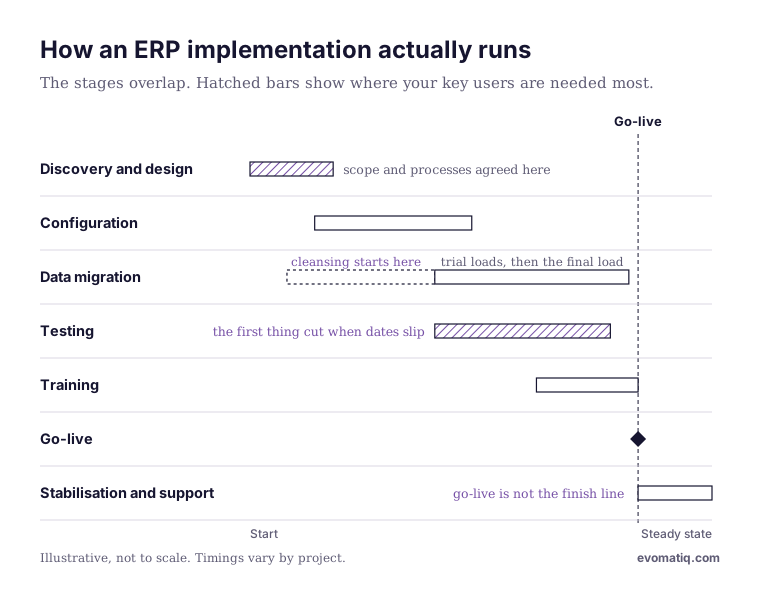
Two honest points to plan for. First, your key users will need to give a meaningful share of their week to the project, roughly (Internal time commitment, e.g. X days per week during design and testing). Second, an ERP won't fix a broken process on its own. It will run whatever process you give it, faster and more visibly. That is why the design stage matters more than the software choice.
Questions to ask before you start
The questions below won't remove every risk, but they surface most of them while they are still cheap to fix. Ask them internally, and ask your implementation partner too.
- What problem are we solving first, and how will we know it is solved?
- Which processes are we willing to change, and which must stay as they are?
- Who on our side owns the project, and how much of their week is protected for it?
- Who owns each set of data, and when does cleansing start?
- Which other systems must connect on day one, and which can wait?
- When is the least disruptive time for us to go live?
- What support do we get in the first three months after go-live, and who provides it?
- What will this cost over three to five years, including support and upgrades, not just the first year?
How we approach it
We're EvomatiQ, an Official Sage partner based in Dubai's Business Bay. Since 2017 we've helped businesses across the region implement and support ERP, CRM, BI and HRMS systems, including Sage X3, Sage 300 and Sage Intacct.
Our approach is shaped by the failure points above. We agree scope in phases, so you see value early. We push for the business decisions that hold projects up, before they hold yours up. We start data work in the first weeks, not the last. And we stay close after go-live, because that is when your team needs us most.
We'll also tell you plainly what a project will take from your side. In our experience, that conversation at the start saves far more time than it costs.
As one client Gaurav Kashyap, Managing Partner, Sundial Tourism said "They coached us on accounting principles & practices, setup our entire software onsite, and were always helpful with the right advice during after-sales support."
If you're planning an ERP project, or one is proving harder than expected, book a no-obligation conversation with our team.
